 ≡
≡
≡
≡
“Security, security and security again” — this was our primary focus. We studied all the ways one could attack a system with automatic logon. We then made LogonExpert autologon software and all its data as protected as it can possibly be, while preserving simple configuration options and an intuitive interface.
Direct integration with WinLogon
LogonExpert directly integrates with WinLogon without using any intermediary software, the Windows registry, or any other insecure storage.
Data security
LogonExpert stores authentication data encrypted with the strong algorithm known as Advanced Encryption Standard (AES).
Post-logon protection
 LogonExpert can lock the workstation desktop immediately after the system is logged on in order to prevent
unauthorized access to the computer.
LogonExpert can lock the workstation desktop immediately after the system is logged on in order to prevent
unauthorized access to the computer.
User rights control
 By default, LogonExpert can be run only under the administrator account. This safeguards logon data even if
there are other users on the computer. However, if necessary you can allow auto login configuration to users
without administrative privileges.
By default, LogonExpert can be run only under the administrator account. This safeguards logon data even if
there are other users on the computer. However, if necessary you can allow auto login configuration to users
without administrative privileges.
Scheduled automatic logon, lock and scheduled logoff
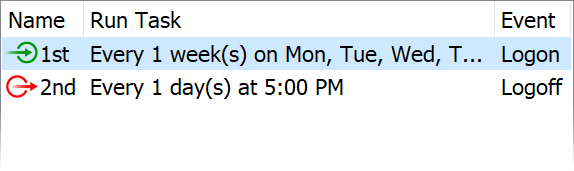 LogonExpert provides you with powerful autologon scheduling. You can set a
simple delay before every logon, or plan a logon (and logoff) for any time in the future.
LogonExpert provides you with powerful autologon scheduling. You can set a
simple delay before every logon, or plan a logon (and logoff) for any time in the future.
Bypassing autologin barriers
Whatever might appear — a legal notice, an unexpected shutdown event or window — LogonExpert will bypass it. Bypassing a standard Ctrl+Alt+Del pre-logon request is handled routinely.
Command Line Control
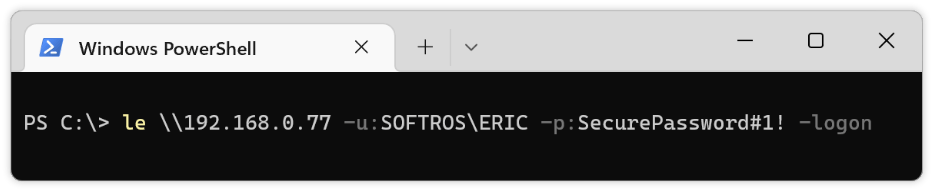 LogonExpert comes with a special executable file that allows you to use most of its functions (logging on and
logging off any user account, locking and unlocking the computer, enabling and disabling autologon, setting up
login credentials etc) through the command line. It also supports the execution
of commands with domain admin authentication on a remote computer using NTLM or Kerberos.
LogonExpert comes with a special executable file that allows you to use most of its functions (logging on and
logging off any user account, locking and unlocking the computer, enabling and disabling autologon, setting up
login credentials etc) through the command line. It also supports the execution
of commands with domain admin authentication on a remote computer using NTLM or Kerberos.
Multi-user Logon
LogonExpert allows you to log on any number of local or domain users to a single computer using LogonExpert Administrator settings, the command line, a batch or script file, or third-party automation software.
Remote configuration, remote logon, logoff, lock, and unlock
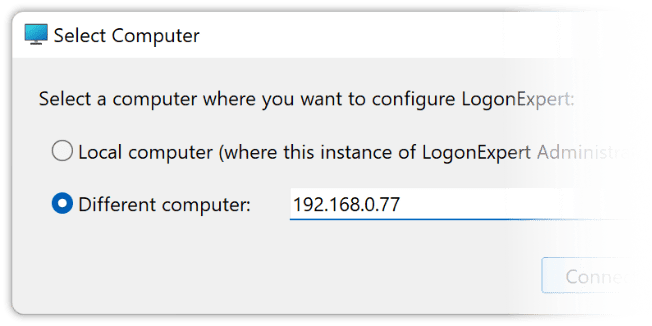 You can now securely configure the program on remote machines using either the LogonExpert Administrator or the built-in command line utility, le.exe.
Additionally, le.exe also allows you to execute remotely logon, logoff, and lock commands.
You can now securely configure the program on remote machines using either the LogonExpert Administrator or the built-in command line utility, le.exe.
Additionally, le.exe also allows you to execute remotely logon, logoff, and lock commands.
Lock user's session transparently
You can protect an automatically logged-on user's desktop by using the standard Windows lock screen or opt to lock it transparently. This transparent lock prevents any unauthorized human access by blocking mouse and keyboard input, including all system shortcuts and even Ctrl-Alt-Del, while keeping the desktop content visible. Additionally, you can schedule a transparent lock task through the built-in LogonExpert scheduler, independently from the standard Windows lock.
Seamless automatic unlocking
No need to enter your logon credentials anymore. Any system or user-initiated computer lock (except for those performed with the LogonExpert command line tool) can be automatically unlocked.
Support of Windows Vista, 7, 8, 10, 11 and their server editions

 Microsoft has included completely new login technology in its latest operating systems. Enhanced security brings
a new level of logon control. LogonExpert meets and complements all of Microsoft’s new requirements, working
perfectly on modern Windows operating systems.
Microsoft has included completely new login technology in its latest operating systems. Enhanced security brings
a new level of logon control. LogonExpert meets and complements all of Microsoft’s new requirements, working
perfectly on modern Windows operating systems.
Ease of autologon interruption
 If your plans change and you do not want to logon automatically, you can easily
interrupt automatic logon: just press a “Shift” key and autologon
will be canceled. If you prefer not to allow users to interrupt automatic logon, you can disable this option.
If your plans change and you do not want to logon automatically, you can easily
interrupt automatic logon: just press a “Shift” key and autologon
will be canceled. If you prefer not to allow users to interrupt automatic logon, you can disable this option.
While this product was developed primarily for servers, it is quite functional for home and office users. LogonExpert does not differentiate between a server or a personal computer.